The short answer
When Facebook ads get clicks but no sales, rule out three things in Ads Manager before you touch the page: whether Meta’s counting changed, what the campaign asked Meta to find, and where the clicks came from. Then check that the ad Meta runs makes your promise, that the page keeps it, and that a phone can buy.
The usual advice for clicks with no sales is to fix the landing page, and the page is often where the sale goes. Before you change it, rule out three things that live in Ads Manager and take minutes to check: a change in how Meta counts sales, a campaign set up to find people who tap rather than people who buy, and clicks from places where nobody meant to tap. If those are clean, the sale went missing between the ad’s promise and your checkout, and the last three checks find where.
Run them in order. Before the first, make sure you have enough visits to judge.
Is zero sales a real signal yet?
Count landing page views, not link clicks. A link click is a tap on the ad. A landing page view is a visit where your page loaded, and only visits can buy. Ads Manager has a column for each.
Then do the sum. At the median conversion rate in Triple Whale’s 2026 benchmarks, 1.53%, a store would see 150 visits pass with no sale about one time in ten, and 300 visits about one time in a hundred. A store whose page converts 0.5% would still see 400 visits with no sale about one time in seven.
Under about 150 visits, zero sales tells you little, so let the ad run. Past 300 with nothing, stop raising the budget and work down the list.
01Did Meta change what it counts?
Set your store’s orders for the dates the ad ran beside the purchases in Ads Manager. In March 2026 Meta began counting only link clicks toward click-through sales. A sale from someone who liked, shared or saved the ad now sits in a separate engage-through count, so purchases credited to clicks can fall while your orders hold steady.
If your store shows orders that Ads Manager doesn’t, the sales are there and only the credit moved, so judge the ad on your store’s numbers. If your store has none either, the sales really are missing. Go on to check 2.
02What did you ask Meta to find?
Meta delivers the result you ask for. Open the ad set and read its performance goal. If it’s link clicks or landing page views, Meta went looking for the people most likely to tap, whether or not they ever buy, and a high click-through rate with no sales is what that goal tends to produce.
Switch the campaign to the Sales objective with Purchase as the conversion event. Meta’s help pages say an ad set needs about 50 of its chosen result in a week to finish learning. If you can’t reach 50 purchases a week, choose add to cart instead. It’s still far closer to a sale than a tap.
03Where did the clicks come from?
With Advantage+ placements on, Meta spends wherever results look cheap: the Facebook and Instagram feeds, Stories, Reels, Messenger, and Audience Network, which shows your ad inside other companies’ apps. Clicks from ads inside games and other apps include taps nobody meant to make.
In Ads Manager, open Breakdown, then By delivery, then Placement, and set link clicks, landing page views and purchases side by side. The gap between the first two is the warning. 400 link clicks and 150 landing page views means 250 taps never became a visit. A placement with most of the clicks, few of the visits and none of the sales is buying taps, so remove it from the ad set.
Run the same breakdown by age and by gender. If most clicks come from people your page isn’t written for, the ad is attracting the wrong buyer, and the ad is what needs to change.
04Does the version Meta runs still make your promise?
Meta’s Advantage+ creative options start from the ad you upload. They reword your text, move it between the headline and the main text, crop and brighten the picture, add music or animate a still image. The product, the offer and the buyer the ad speaks to all come from your ad, so a men’s hair ad is still a men’s hair ad after Meta’s edits, and the promise you wrote is the promise your page has to keep.
The AI does sometimes get it wrong. In June 2026 REI pulled an Instagram ad after a Meta AI tool gave a bike a second set of handlebars, and in July Business Insider reported Meta’s AI turning a pyjama dress into a shirt and trousers and adding men to an ad for a women’s networking group. From 30 October 2026, Meta’s terms make the advertiser responsible for what its AI changes, including options Meta switches on itself.
So open the ad in Ads Manager, find the Advantage+ creative section, and read the versions in the preview. If one changes the product, the person or the promise, switch that option off for this ad. If they all keep your promise, the answer is on the page.
05Does the page keep the promise of the ads Meta spends on?
When several ads point at one page, Meta decides which of them gets the money. The page may match the ad you launched first and miss the one Meta now spends most on. Sort your ads by amount spent, take the top three, and tap each one on your phone the way a buyer would. Read only what you can see before you scroll, then scroll to the buy button.
- The ad’s main promise should be there in words close to the ad’s. The person in the ad’s picture counts as a promise too, since it tells viewers who the product is for.
- If the ad named a discount or free shipping, a visitor should see it without hunting, and the cart should still apply it.
- Beside the button, a doubtful buyer looks for reviews with a count, the guarantee, the delivery time and the returns policy. In Baymard Institute’s checkout research, 19% of US shoppers who abandoned an order didn’t trust the site with their card, and 13% left over the returns policy.
The ad with the most spend and the fewest sales gets a page of its own, or the page’s first screen takes its promise.
With several ads in one report, Portfolio Diagnosis lines them up by the angle each one takes, so you can see which buyer each ad is speaking to.
06Can someone buy inside the app, on a phone?
Since Meta moved Facebook and Instagram shop checkout to brands’ own websites in 2025, every sale from these ads finishes on your site, and on a phone it starts in the app’s built-in browser. Phones bring most of the traffic and close less of it: in Contentsquare’s 2026 figures, quoted in Shopify’s guide to conversion rates, 69.9% of visits came from phones, and retail sites converted 2% of them against 3.7% on a desktop.
- Run your page through Google’s PageSpeed Insights. On mobile, the Largest Contentful Paint, the time until the biggest thing on the first screen appears, should be 2.5 seconds or less. That’s where Google draws the line for good.
- Tap your own ad inside the Instagram or Facebook app and buy something with a 100% discount code. Note every field you have to type that your phone would normally fill in, and anything that covers the page: an email pop-up, a chat bubble over the add to cart button, a cookie banner over the price.
- On the way, note every cost that appears late. In Baymard’s research, extra costs such as shipping, taxes and fees were the most common reason US shoppers gave for abandoning a checkout, cited by 40%.
Every check passes and it still doesn’t sell?
Then the gap is usually upstream of the ad and the page. Both say what the brand wants to say, while buyers decide on something else. Buyers in every category carry their own worries. Will this work for my hair type? Will it upset my stomach? Is it better than the one I already tried?
You find those worries in what buyers write: reviews of your product and your competitors’, questions in online discussions and communities, and the comparisons people post before they buy. Copy the doubts word for word into one list. If the one that comes up most is answered nowhere in your ad or on your page, that’s the next fix.
Then ask an AI assistant what it thinks of your brand and your category, the way an undecided buyer might. Those answers reach people close to buying: Adobe found that in July 2026, visits to US retail sites from AI assistants converted 60% better than other visits. If the answer leaves you out or repeats a complaint, put the reply to that complaint on your page, where a buyer will see it.
Toniqe’s Market Intelligence does the reading for you. It quotes what buyers in your category say, word for word, and shows which of their worries your ads never mention.
A real example: the hair ad that landed on the wrong page
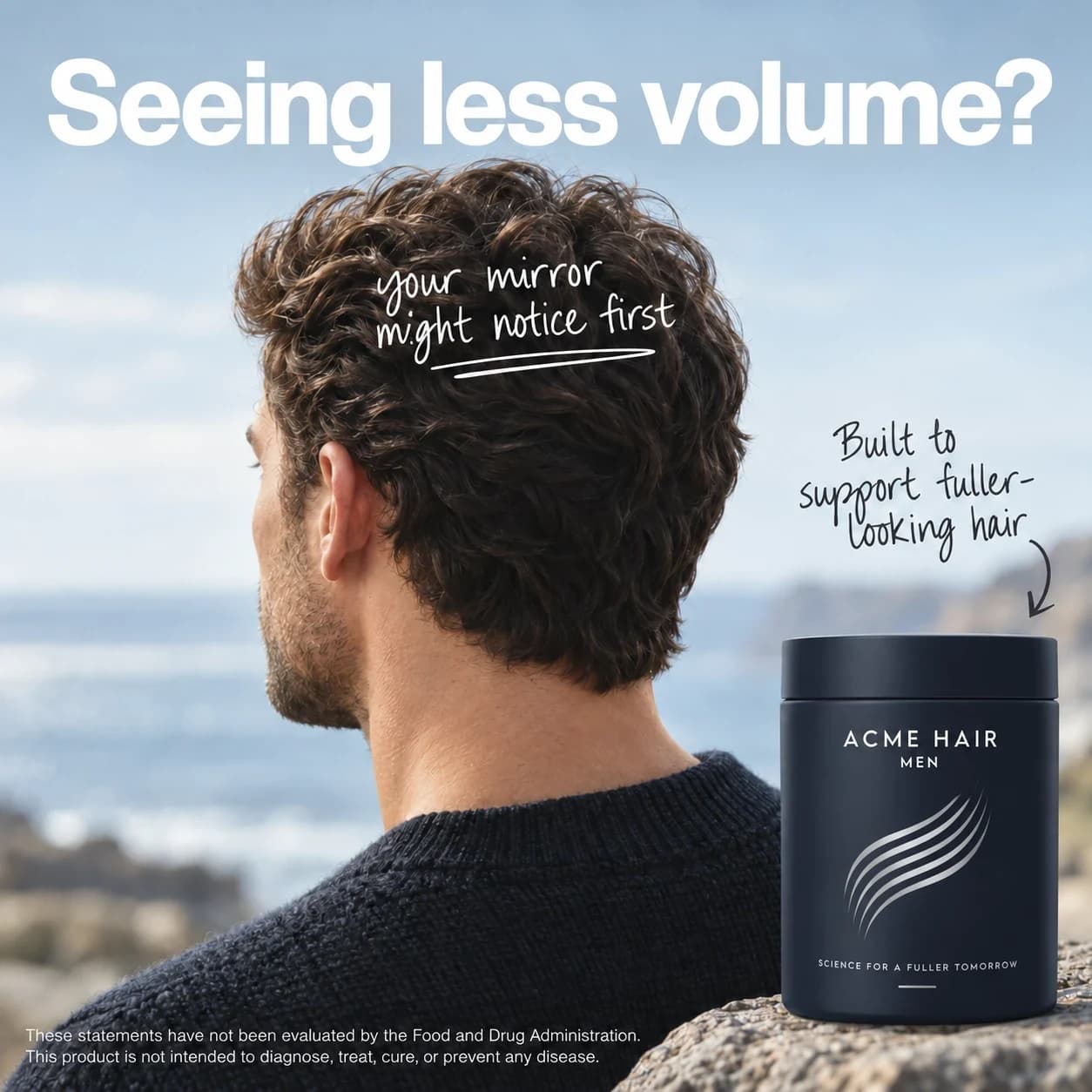
One Toniqe report, with the brand renamed Acme, shows check 5 failing on a live ad. The ad was for men and promised a visibly fuller hairline, with results or your money back.
The ad
Where it landed
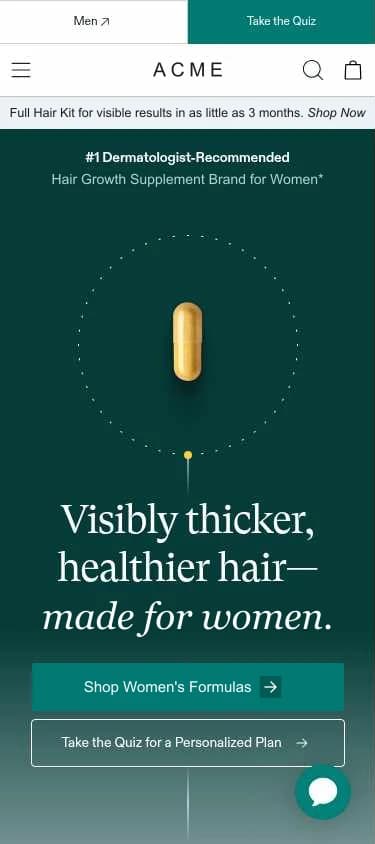
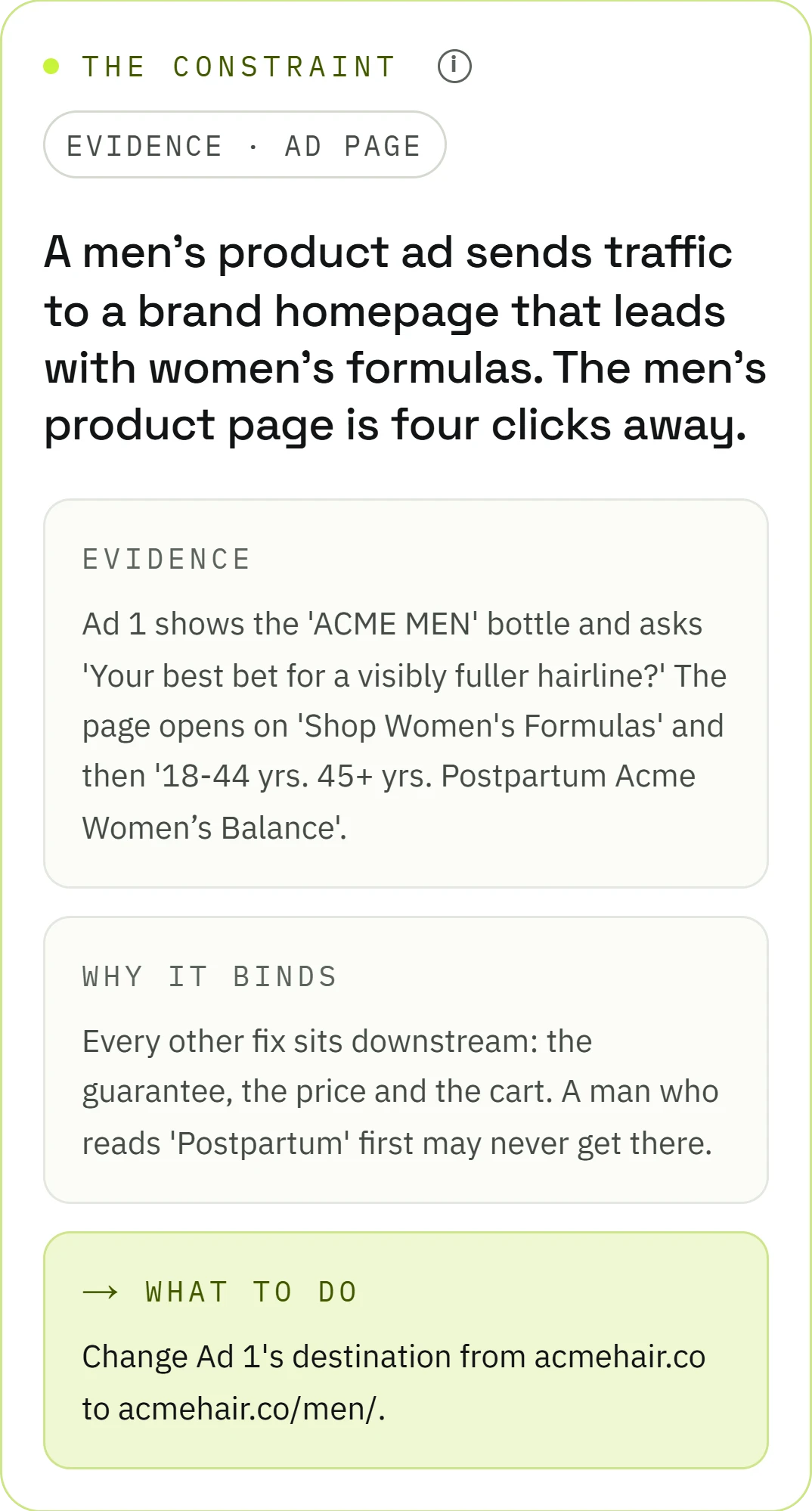
The ad sent everyone to the homepage. The homepage led with women’s formulas and a quiz, with a small Men link, and the men’s product page sat four clicks away. Toniqe’s promise check marked the money-back guarantee as a match, the fuller hairline as weak, and the men’s product as missing from the page. It marked the page itself as a contradiction: an ad for men, sending people to a page built around women’s life stages.

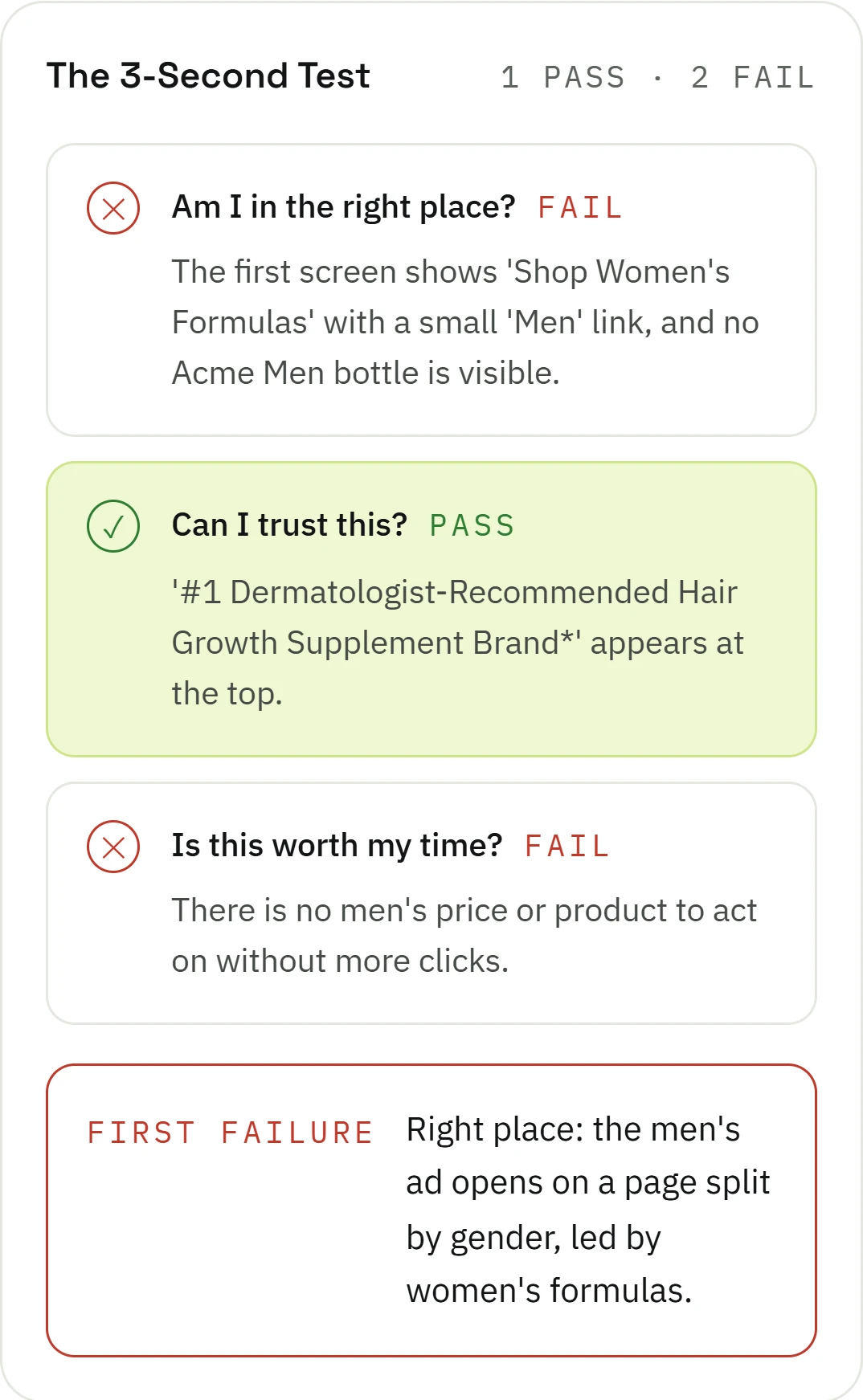
The three-second test failed on its first question, “Am I in the right place?” The report summed up what a visitor would think on landing: “Postpartum? Is this even for me?”
Toniqe scored the ad and page together at 50 out of 100, in the Needs work band, and named the destination as the one problem holding the score back. The first fix on the list took about five minutes: point the ad at the men’s product page. The ad itself didn’t need to change for that.
How to run these checks yourself
You need Ads Manager, your phone and your store’s admin.
- Wait for at least 150 landing page views before reading anything into zero sales.
- Set your store’s orders beside Ads Manager’s purchases for the same dates.
- Read the ad set’s performance goal. Anything short of a purchase or an add to cart gets changed.
- Break down results by placement, then by age and gender. Remove the placements that get clicks and no visits.
- Open Advantage+ creative on each ad and check that every version Meta may run keeps your product and your promise.
- Tap your three biggest-spending ads on your phone and find each one’s promise, offer and proof on the page.
- Run PageSpeed Insights, then buy with a 100% code from inside the Instagram app.
- If everything passes, read what buyers and AI assistants say about your category, and check that your page answers the biggest worry.
How Toniqe runs them
Checks 1 to 3 live in your Ads Manager. Toniqe takes the rest, starting with your market. It reads what buyers say about your category in online discussions, communities and reviews, then reads your ads (the picture, the text and the voiceover) and your landing page together. It checks every promise against the page, walks from your page to checkout on a phone and a desktop, and gives the ad and page one Toniqe Score, with the one problem holding it back and every fix ranked by what it’s worth.
It works from your ad and your landing page, as a link, a screenshot or a mockup. No ad account access is needed, and a report takes under 15 minutes. Start your free trial. Free for 7 days or 5 reports. No card needed.
Questions people ask
My ads have over a 4% CTR but zero sales. What’s wrong?
A 4% click-through rate is well above the median for Meta ads, which was 2.39% across more than 40,000 online brands in Triple Whale’s 2026 benchmarks. A rate that high with no sales is worth questioning first. Check that the ad set’s goal is purchases rather than clicks, and that the clicks don’t come mostly from one placement or app. If both are clean, look at the page and checkout.
My ad has a good CTR but poor conversions. What do I check first?
Set your store’s orders beside Ads Manager’s purchases for the same dates. If they agree, break down results by placement and see where the clicks came from. Then tap the ad Meta spends most on and read the first screen of the page it opens.
Why did my Meta purchases drop after March 2026?
In March 2026 Meta began counting only link clicks toward click-through sales. Sales from people who liked, shared or saved an ad moved into a separate engage-through column, so purchases credited to clicks can fall while your store’s orders stay the same. Compare the two before you change the ad or the page.
Can Meta’s AI change what my ad promises?
Its Advantage+ creative options start from your ad: they reword the text, crop the picture, add music or animate a still, and the product and promise come from what you uploaded. The AI has made mistakes in 2026, such as a pyjama dress shown as a shirt and trousers, and from 30 October Meta’s terms make the advertiser responsible for them. Read the versions in the ad’s preview and switch off any option that changes the product or the promise.
How many clicks should it take to get a sale?
At the median conversion rate in Triple Whale’s 2026 benchmarks, 1.53%, a store makes about one sale for every 65 clicks. Judge by landing page views rather than link clicks, since only visits can buy. At that rate, 300 visits with no sale would happen about one time in a hundred, so past 300 something is very likely wrong.
Should I turn the ad off?
Cap its budget while you run the checks. Turn it off if checks 2 and 3 show it was buying taps from people who were never going to buy, or if the version Meta spends most on promises something your page can’t offer. Otherwise fix the page, then judge the ad on the sales it brings.